
| 일 | 월 | 화 | 수 | 목 | 금 | 토 |
|---|---|---|---|---|---|---|
| 1 | 2 | 3 | 4 | 5 | 6 | 7 |
| 8 | 9 | 10 | 11 | 12 | 13 | 14 |
| 15 | 16 | 17 | 18 | 19 | 20 | 21 |
| 22 | 23 | 24 | 25 | 26 | 27 | 28 |
| 29 | 30 | 31 |
- HTTP
- 이벤트 핸들러
- 노드 삭제
- eventlistener
- 파이썬 코테
- 코딩테스트
- 리다이렉트
- 노드 replace
- 자바스크립트 이벤트
- Array
- element
- Object
- 이벤트
- debugging
- 문자열
- 노드
- innerHTML
- addEventListener
- 자바스크립트
- Servlet
- webprogramming
- backend
- 노드 객체
- jsp내장객체
- 노드 추가
- HTML
- HtmlElement
- 포워드
- javascript
- Web
- Today
- Total
seoyoung.dev
Redirect/Forward/서블릿파일과JSP파일 연동 본문
* 리다이렉트
- 리다이렉트는 http 프로토콜로 정해진 규칙이다.
- 서버는 클라이언트로부터 요청을 받은 후, 클라이언트(브라우저)에게 특정 url로 이동하라고 요청할 수 있다.
- http 리다이렉트는 요청에 대해 특별한 응답, 즉 리다이렉트를 전송함으로써 수행된다.
- ( http 리다이렉트 : 3xx 상태 코드를 지닌 응답을 보낸다 )
- 서버는 클라이언트에게 HTTP 상태코드 302로 응답하는데, 이 때 헤더 내 Location 값에 이동할 url 을 추가한다.
클라이언트는 리다이렉션 응답을 받게되면, 헤더에 포함된 url로 재요청을 보내고 이때, 브라우저의 주소창은 새url로 바뀌게 된다.
-> 서블릿 이나 JSP 는 리다이렉트 하기 위해서, HttpServletResponse 클래스의 sendRedirect() 메소드를 사용한다.
   //redir01.jsp

   <%
    response.sendRedirect("redir02.jsp");
    %>
//redir02.jsp
<html>
<head>
<meta charset="UTF-8">
<title>Insert title here</title>
</head>
<body>
redirect된 페이지 입니다.
</body>
</html>
-> redir01.jsp 에서 응답response객체의 sendRedirect 메소드를 사용, redir02.jps로의 리다이렉트를 요청
-> 웹 브라우저는 해당 응답을 받고, redir02 를 요청
-> redir02.jsp 의 결과를 출력
-> url은 해당 리다이렉트 요청을 보낸 곳, redir02.jsp 로 바뀐다.
: 클라이언트는 요청을 " 두 번 " 보낸다
-> 요청 객체는 응답 객체랑 같이 생겨
-> 첫번째 요청과 응답 객체와 두번째 redir02.jsp 요청과 응답 객체는 다른 한 쌍이다.
* Forward
|
1. 웹 브라우저에서, Servlet 1 에게 요청을 보낸다. (request와 response 객체 생성) 2. Servlet 1 에서 요청을 처리한 후, 그 결과를 HttpServletRequest 에 저장 ( Servlet 1 에서 처리한 결과를 Servlet 2 에서 또 사용해야 된다면, 결과는 Servlet 2 로 보내는 Request에 저장 )
3. Servlet 1은 결과가 저장된 HttpServletRequest와 응답을 위한 HttpServletResponse 를 같은 웹 어플리케이션에 있는 Servlet 2 에게 전송 => " forward " ( 요청, 응답 객체를 알아야 하므로 같이 넘겨준다. ) 4. Servlet 2 는 HttpServletRequest 와 HttpServletResponse 를 이용, 요청을 처리한 후, 브라우저에게 결과를 전송
|
< 리다이렉트 와 포워드 헷갈림 주의 >
-> 리다이렉트는 요청과 응답 객체가 두번 생성되지만, 포워드는 처음 요청 시에 생성된 요청과 응답 객체 하나뿐이다.
-> 포워드 는 요청을서버가 내부적으로 옮겨줬을 뿐, 하나의 요청과 응답만을 사용
-> 리다이렉트는 요청 - 응답 - 요청 - 응답 순으로 두 번의 요청을 수행
//frontServlet - service 함수만 오버로딩
//랜덤 으로 고른 숫자만큼 hello 출력할 것이다.

protected void service(HttpServletRequest request, HttpServletResponse response) throws ServletException, IOException {

		int diceValue = (int)(Math.random() *6)+1;

		request.setAttribute("dice", diceValue);
		//("request 객체에 맡길 때 사용할 이름", 실제 맡길 값)
		//request 객체에 setAttribute 할 값은 Object 타입 -> diceValue

		RequestDispatcher requestDispatcher = request.getRequestDispatcher("/next");
		requestDispatcher.forward(request, response);

	}
-> RequestDispatcher : 클라이언트로부터 최초로 들어온 요청을 JSP / Servlet 내에서 원하는 자원으로 요청을 넘기는 역할을 수행하거나, ( 특정 자원에 처리를 요청하고, 처리 결과를 얻어오는 기능을 수행하는 ) 클래스
[-> 리다이렉트 방식은 현재 어플리케이션 이외에 다른 자원의 경로를 요청할 수 있지만, RequestDispatcher 를 사용한 포워드는 현재 처리중인 서블릿이 속해있는 웹 어플리케이션 범위 내에서만 요청을 제어할 수 있다. ]
// nextServlet
// url mapping 값 "/next" 로 edit


protected void service(HttpServletRequest request, HttpServletResponse response) throws ServletException, IOException {
		response.setContentType("text/html"); //응답 콘텐트타입

		PrintWriter out = response.getWriter();
		//response객체의 getwriter메소드로 printwriter 객체 하나 생성
		out.println("<html>");
		out.println("<head><title>form</title></head>");
		out.println("<body>");

		int dice = (Integer)request.getAttribute("dice");
		//request에 맡긴 값을 get메소드로 얻어오기
		//setAttribute 시에 Object 형태이므로 get할 때 형 변환

		out.println("dice : "+ dice);
		for(int i =0;i<dice;i++) {
			out.print("<br>hello");
		}

		out.println("</body>");
		out.println("</html>");
		}
-> 처음에 요청한 request 에 대한 response 이므로, url 변하지 않는다.
* Servlet 과 JSP 연동
- Servlet : 서블릿 파일 자체로 자바 파일이므로, 프로그램 로직이 수행되기에 더 유리하다.
- JSP : 결과를 출력하기에 Servlet 보다 유리하다.
( 서블릿에서는 out.print() 에서 문자열로 html 태그를 하나하나 다 넣어줘야 했기 때문에!)
--> 서블릿에서 프로그램 로직을 수행하고, 그 결과를 JSP 에게 포워딩하는 방법을 사용하면 되겠다.
//LogicServlet.java
- 포워드 할 때 도움을 주는 객체 : Request 객체가 갖고있는 requestDispatcher 객체
- request 객체에 setAttribute 로 저장, 하고 requestDispatcher 객체로 FORWARD
protected void service(HttpServletRequest request, HttpServletResponse response) throws ServletException, IOException {

	int v1 = (int)(Math.random()*100)+1;
	int v2 = (int)(Math.random()*100)+1;

	int result = v1 + v2;

	request.setAttribute("v1", v1);
	request.setAttribute("v2", v2);
	request.setAttribute("result", result);

	RequestDispatcher Dispatcher = request.getRequestDispatcher("/result.jsp");
	Dispatcher.forward(request, response);

	}
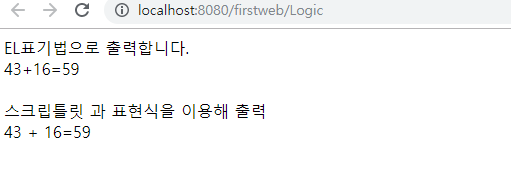
//result.jsp
<body>
	EL표기법으로 출력합니다. <br>
	${v1}+${v2}=${result} <br><br>

	스크립틀릿 과 표현식을 이용해 출력 <br>
	<%
	int v1 = (int)request.getAttribute("v1");
	int v2 = (int)request.getAttribute("v2");
	int result = (int)request.getAttribute("result");
	%>

	<%=v1 %> + <%=v2 %>=<%=result %>
</body>
//EL, JSTL...: 자바코드를 최소한 해서 출력할 수 있도록 , 간단하게 쓸 수 있다.
'WEB > JSP' 카테고리의 다른 글
| HttpServlet Class- service/doGet/doPost 메소드 (0) | 2019.10.11 |
|---|---|
| Scope에 대하여-[Page/Request/Session/Application] (0) | 2019.10.07 |
| JSP/JSP의LifeCycle/JSP 내장객체 (0) | 2019.10.06 |